
Problem
I love cooking and finding new recipes online. But discovering a recipe and having time to cook it rarely happen at the same moment - I'd get excited, then forget it existed in a browser tab or notes app.
Online recipes are their own problem: optimized for Google, the actual recipe buried under a life story, banner ads, autoplaying video, and pop-ups.
So the problem was two-fold:
- I don't have anywhere to save the recipes I find online and pull them out whenever I actually have the time to cook.
- Recipes online are filled with content that is making it hard to actually follow along the recipe.
My Role
Recipe Fox is a solo project - I owned product strategy, UX and visual design, the App Store and Google Play listings, and launch. Claude Code carried the engineering and the same-day OTA fixes that keep it maintained. No handoff - I work the way I describe in How I build.
Decisions
The most useful exercise was mapping the full journey - from spotting a recipe to standing at the stove. The two ends are opposite contexts: browsing is casual (time, both hands, full attention); cooking is none of those. No app I tested reflected that - all built for browsing, leaving you to manage the kitchen yourself.
Saving a recipe
See a recipe on Instagram. Copy the link. Switch apps. Paste it into a notes app. Close the tab. Eventually forget it exists.
7 steps and two app switches, every time
Saving a recipe
See a recipe anywhere. Tap share. Tap Recipe Fox. Saved with photo, title, and ingredients - ready to browse later.
2 steps from any app, no copying or pasting
Deciding what to cook
Scroll through browser bookmarks or a notes list. No images, no context. Click each link to remember what it was. Half are broken.
A graveyard of links with no way to browse
Deciding what to cook
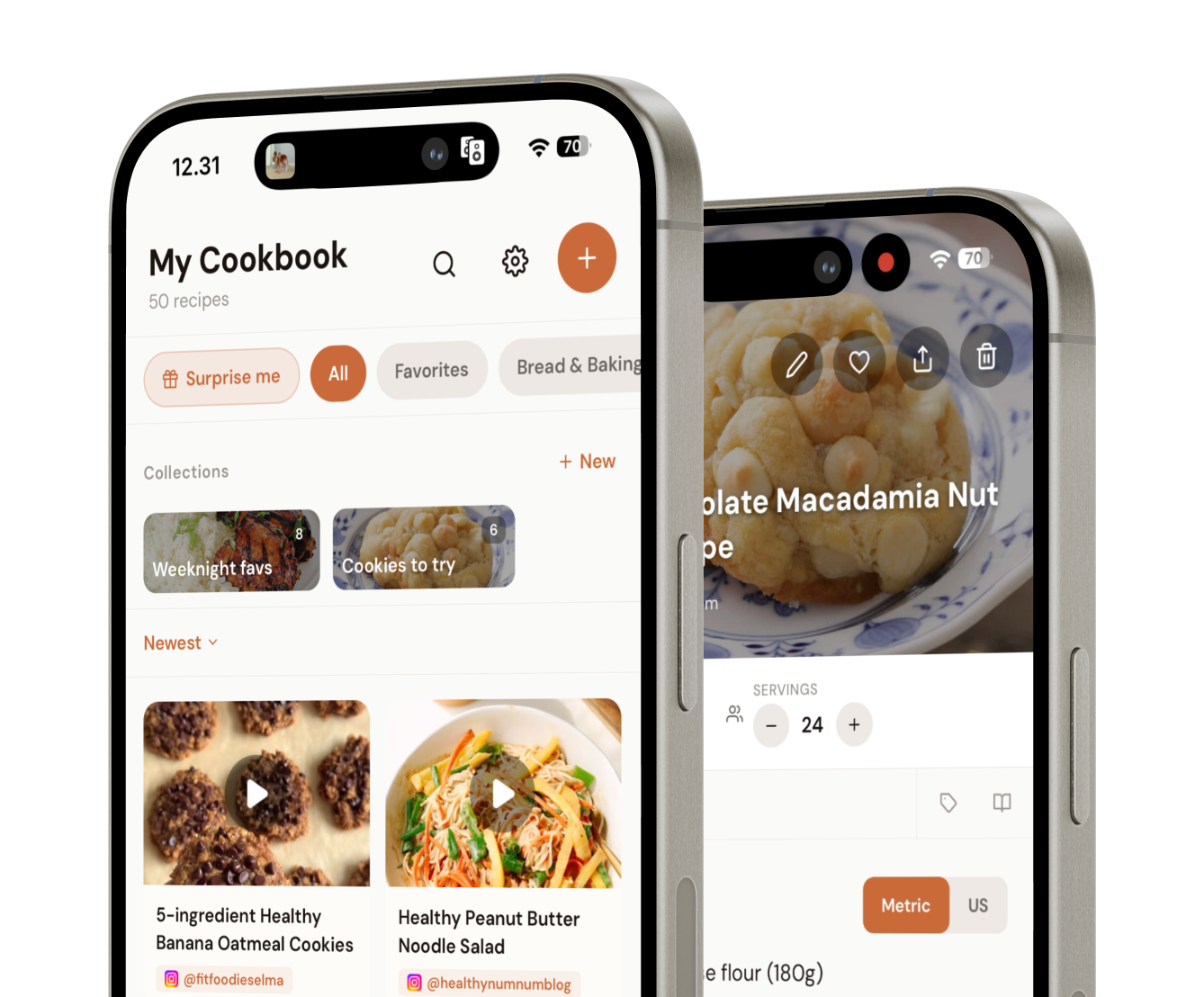
Open your cookbook. Visual grid, scan at a glance. Filter by favorites, collections, or cuisine. Pick something and start.
Browse like you're walking past a shelf
Actually cooking
Open the original website. Scroll past the life story and ads. Try to follow a wall of text while one hand stirs and the screen goes to sleep.
Designed for reading, not for kitchens
Actually cooking
Open Cook Mode. One step at a time. Tap to advance. Ingredients on a separate view. Screen stays on. Both hands free to cook.
Designed for the stove, not the sofa
Radical scope restriction
Before setting scope, I mapped and tested 12 recipe apps, read 200+ one-to-three-star reviews of the top competitors, and searched cooking subreddits for frustrations. The field had clustered in one place: social-first, feature-heavy, built around sharing - not cooking.
Three complaints recurred across 200+ reviews: too many features, too complicated, "why am I paying $40 a year just to store my own recipes." The considered-and-rejected path was adding adjacent features (meal planning, shopping lists - proven, and most competitors have them). I went the opposite way: strip it to one thing and make that genuinely good. No shopping list, no social feed, no meal planning.
Same data shaped pricing: a $9.99 one-time unlock, not a $30-50/yr subscription. Pay-once doubles as a demand signal - if people pay up front for a stripped-down app, the scope bet is validated. I also didn't user-test before building - deliberate. The category is proven, so demand wasn't the question; the research answered whether a real gap remained. Building before testing isn't reckless if you've done the homework.
Cutting scope was a design decision, not a resource constraint.
Share extension over copy-paste
V1 shipped with URL paste. It worked, but barely - Sentry reports and my own daily use kept surfacing failed imports (TikTok and Instagram especially), and the seven-step flow made every save a chore. I replaced it with a native share extension.
Before - URL paste (7 steps)
- 1 Open recipe in browser
- 2 Tap share
- 3 Copy link
- 4 Switch to Recipe Fox
- 5 Tap add
- 6 Tap input field
- 7 Paste & save
After - share extension (2 steps)
- 1 Tap share
- 2 Tap Recipe Fox
Import friction determines whether users build a recipe library or abandon the habit after a few saves.
Share extension in the shipped product.
Cook Mode - one step at a time
Most apps had a basic cook mode, but none designed for the cooking context. I built a dedicated Cook Mode showing one step at a time, not a full scrollable page. A scroll is fine with both hands free - terrible when they're wet or holding a spatula. One step at a time removes navigation entirely: the cook sees exactly what they need now, nothing else.
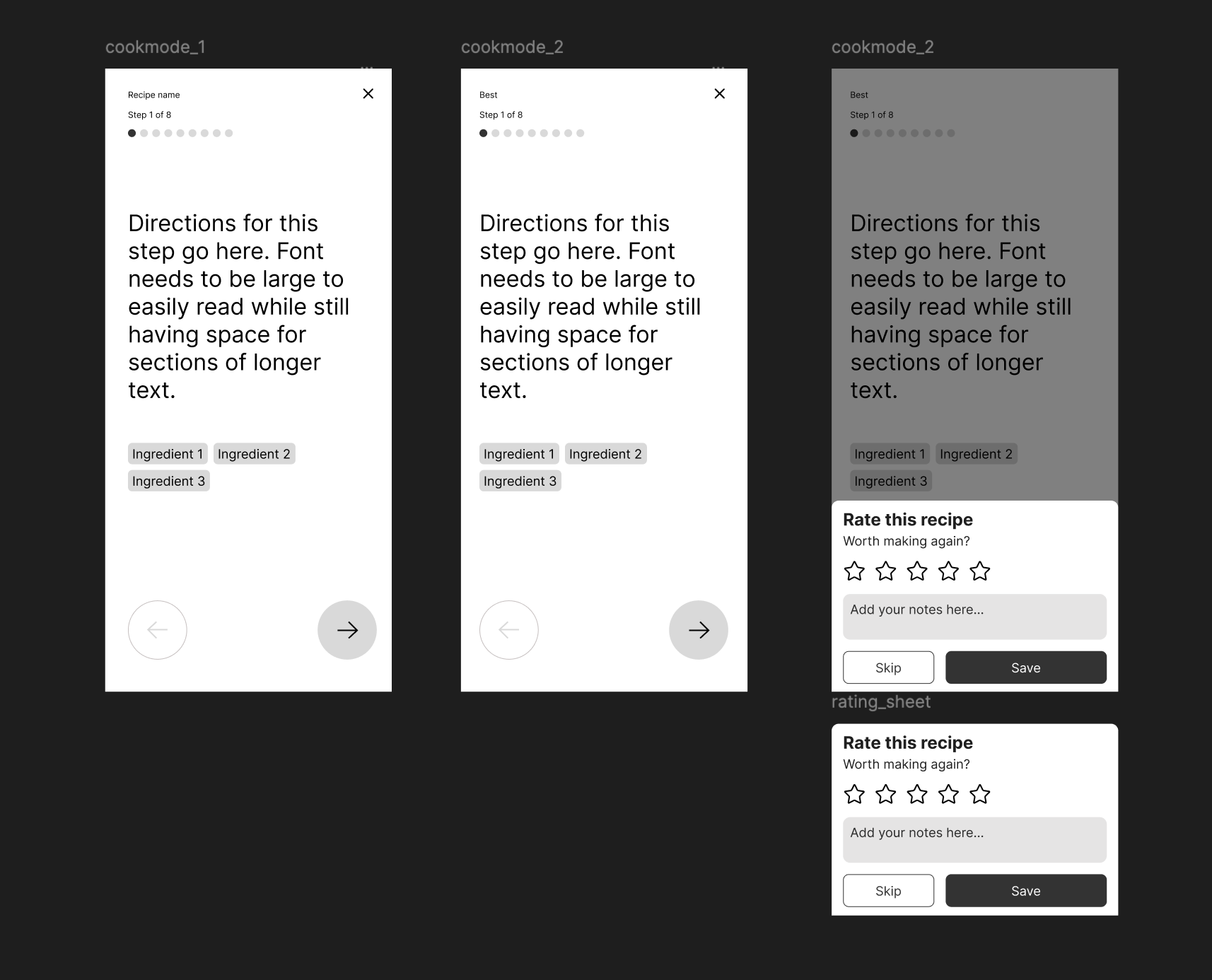
Cook Mode in the shipped product.
Outcome
The number that matters most: two of every three recipes saved come in from TikTok or Instagram through the share extension. That's the product's core bet - people cook from social video now, not just websites - showing up in production data, and it's why the share extension got the design investment it did. Beyond that: 1,250+ sign-ups with $0 in paid marketing, 270 of them in the last 30 days - the strongest month yet, driven almost entirely by TikTok, which users name as how they found the app. People who save recipes keep 4+ each.
Soft launch - no press, no paid marketing. I found people who already had the problem: cooking subreddits, parenting forums, and food groups full of "what do you use to save recipes?" threads, and recommended Recipe Fox where genuinely relevant.
Longer term, I started building Instagram and TikTok content - clips of the share extension and Cook Mode - to grow an audience before the next major update, not after. 200+ sign-ups came in the first month, now past 1,250, still $0 paid - and growing faster than at launch, a better signal than a spike that fades in a week.
Lessons learned
- Slow down on shipping. Early on I pushed releases fast, thrilled by how quickly an idea became a feature. That energy was better spent on clarity than velocity - not every idea needed to ship in week two.
- Start with distribution, not the product. The hard problem isn't building something that works - it's finding the people who need it. Next time: build an audience before the app exists - waitlist, content, community.
- A well-built app is invisible without a growth strategy. The product doing exactly what you imagined only matters when other people find it.
I save all recipes I find online and on instagram in the app Recipe Fox. Makes it easy to find them and pick something to cook for dinner.
Oh interesting, I didn't know Recipe Fox! When you're picking something to cook for dinner, do you browse the app and decide in the moment, or do you plan the week ahead from it? And the Instagram saves, do you go directly to the app to save or is there a step of copying the link manually?
Yeah I basically dump everything that looks interesting into the app and then I'll browse a few times a week and favorite the ones I wanna try. Or create a collection (a folder basically) and call it something like "birthdays" or "weekend dinners" and put recipes that match those in there.
For saving recipes from Instagram, you just share and click the Recipe Fox app icon. super easy